
You probably remember the satisfying click of a MacBook charger snapping into place. That brilliant safety mechanism saved countless laptops from disastrous falls.
Today, Apple has repurposed that famous name for the iPhone, but the focus has shifted from pure safety to versatility. MagSafe is now a proprietary system of magnets and sensors designed to create a seamless bridge between your device and a vast library of accessories.
It solves the annoying alignment issues of wireless charging while enabling snap-on wallets and floating mounts.
Types of MagSafe
Apple has a habit of recycling successful brand names, which can cause confusion when shopping for accessories. The term MagSafe currently applies to two entirely different charging technologies.
One is a dedicated charging port found on MacBook computers, while the other is a wireless system integrated into the rear of iPhones. While they share a name and reliance on magnetism, they function independently and solve different problems for the user.
MagSafe for Mac: The Safety Connector
The original iteration of this technology was born from a practical necessity. Laptop chargers previously relied on friction-fit plugs that locked into the machine.
If someone walked by and snagged the cable, the laptop would often be pulled off the table along with the cord. Apple introduced MagSafe as a magnetic power connector that detached safely under tension.
The primary goal was to ensure that if the cable was tripped over, it would break the connection cleanly and leave the computer safely on the desk.
Over the years, this connector has seen several design shifts. It began with the T-shaped and L-shaped plastic heads known as MagSafe 1 and 2.
After a brief period where Apple removed it in favor of USB-C charging, they reintroduced the standard as MagSafe 3. This modern version features a durable braided cable and supports higher power delivery for the latest MacBook Pro models, while retaining that signature quick-release safety mechanism.
MagSafe for iPhone: The Accessory Ecosystem
The version found on phones functions differently. Introduced with the iPhone 12, this system is not a plug-in port but a circular array of magnets buried beneath the glass back of the device.
It was designed to enhance the capabilities of wireless charging and create a new method for attaching accessories.
Rather than just transmitting power, this implementation creates a hardware platform. It allows the phone to firmly grip external objects.
This transforms the back of the device into a utility surface that can hold chargers, stands, or wallets. It turns the entire rear of the phone into a mounting point, which opens up functionality that was previously impossible without bulky clamp-style cases.
Primary Differences
The distinction lies in their utility. The Mac version is strictly a power delivery method designed for safety and cable management.
It does not transmit data or hold accessories. The iPhone version acts as a connection hub for a broader ecosystem. It is important to note that the hardware is not cross-compatible.
You cannot use a MacBook charger on an iPhone, nor can you snap an iPhone wallet onto a Mac charging port.
The Mechanics of MagSafe for iPhone

The technology appears simple from the outside, but it relies on a complex layering of materials inside the device housing. Apple engineered a specific stack of components to allow magnetic attachment without interfering with the phone’s internal electronics or signal reception.
Internal Components
Under the glass surface of a compatible iPhone lies a sandwich of specialized parts. The foundation is a copper-graphite shield, which manages heat and magnetic flux.
Above this sits the charging coil which transmits energy. Surrounding that coil is the most recognizable component: a precise ring of magnets arranged to alternate polarity.
Another critical element is the NFC (Near Field Communication) coil nestled within the array. This allows the iPhone to communicate with the accessory being attached.
When you snap on a certified case, the phone recognizes the specific accessory and might display a color-matched animation on the screen. This digital handshake confirms that a genuine accessory is connected and ensures the device adjusts its power settings accordingly.
Solving the Alignment Issue
Standard wireless charging, known as Qi, has always suffered from a "sweet spot" problem. If the phone is not placed exactly over the charger's coil, the charging speed drops significantly or fails entirely.
Users often wake up to a dead phone because it vibrated slightly off-center during the night.
MagSafe eliminates this variable. The magnets exert a pulling force that physically drags the charger into perfect alignment with the phone’s internal coil.
This "snap" mechanism removes the need for the user to adjust the position. The connection is binary; it is either connected perfectly or not connected at all.
The Orientation Magnet
A circular ring alone would allow accessories to rotate freely, which is not ideal for items like card holders or battery packs. To address this, Apple included a smaller vertical alignment magnet located just below the main ring.
This resembles the tail of a "Q" shape.
This small strip serves as an anchor. When you attach a wallet or a battery pack, the alignment magnet locks the accessory into a vertical orientation.
It prevents the item from spinning or sliding sideways, which ensures that whatever is attached to the back of the phone stays parallel to the device edges.
Charging Speed and Efficiency Benefits

Convenience is the most visible benefit of magnetic charging, but the technology also yields performance improvements over standard wireless methods. By controlling the physical connection between the charger and the device, Apple can push higher wattages safely.
Wattage Comparisons
Standard Qi wireless charging on iPhones is generally restricted to 7.5W. This limit is often in place because standard chargers cannot guarantee perfect coil alignment, which can lead to inefficiencies.
MagSafe bypasses this limitation. Because the magnets ensure a perfect link, the system can safely charge at speeds up to 15W or even 25W on the latest models.
This effectively doubles or triples the power throughput compared to a generic wireless pad.
Thermal Management
Wireless charging inherently generates heat. When coils are misaligned, the system becomes inefficient, and much of that lost energy is converted into waste heat.
This can cause the phone to throttle charging speeds to protect the battery.
The precise alignment provided by the magnetic array minimizes this energy loss. Furthermore, the system includes active communication between the charger and the phone.
System intelligence monitors internal temperatures in real-time. If the device gets too warm during a fast-charge cycle, it will regulate the power draw to maintain battery health without the user needing to intervene.
MagSafe vs. Lightning and USB-C
While magnetic wireless charging is significantly faster than standard wireless options, it still trails behind a direct wired connection. A USB-C cable plugging directly into the port offers the fastest possible charge and the most efficient energy transfer with zero wireless loss.
MagSafe is a balance between convenience and speed. It provides a "fast enough" solution for daily use while eliminating the friction of plugging in a cable, but for emergency top-ups where every minute counts, a physical wire remains the superior choice.
The Accessory Ecosystem

The true utility of the MagSafe system extends well beyond simple battery charging. By standardizing the connection method on the back of the device, Apple created a modular platform that allows users to attach a wide variety of tools.
This system replaces cumbersome clips and adhesives with a clean magnetic bond, which allows the iPhone to adapt to different environments instantly.
Mounting Solutions
Car mounts were historically frustrating accessories that required bulky plastic clamps or the application of permanent adhesive metal plates to the back of the phone. These metal plates often interfered with standard wireless charging signals, which forced users to choose between mounting convenience and charging functionality.
The magnetic array solves this dilemma completely. A compatible car mount holds the phone securely through magnetic force alone.
The connection is strong enough to withstand bumps in the road yet allows the driver to grab the phone and go without fiddling with release buttons.
This "floating" suspension style applies to the home and office as well. Desk stands lift the phone off the table at an ergonomic angle, which makes them ideal for FaceTime calls or checking notifications.
This orientation is particularly useful for the "StandBy" feature introduced in recent iOS updates. When placed horizontally on a magnetic charging stand, the iPhone transforms into a smart display that shows clocks, calendars, or photos.
Carry and Convenience
The ecosystem dramatically simplifies daily carry items. The most popular accessory in this category is the magnetic wallet.
These slim leather or fabric cardholders snap directly onto the back of the phone and typically hold two or three essential cards. It appeals to minimalists who want to leave their bulky main wallet at home.
Because the wallet is shielded, it protects credit cards from being demagnetized by the phone itself.
Portable power has also seen a redesign. Traditional power banks require a cable tethered to the phone, which makes it difficult to use the device while charging in a pocket or bag.
MagSafe battery packs eliminate the wire entirely. They snap onto the back of the iPhone and initiate charging immediately.
While these packs may not offer the massive capacity of larger brick-style batteries, the form factor allows for comfortable one-handed use while the device refuels.
Content Creation
Photographers and videographers have adopted the system for its speed and reliability. Magnetic mounts allow creators to attach their phones to tripods, gimbals, or selfie sticks in seconds without screwing in clamps.
It also facilitates the attachment of external lighting rings and microphones directly to the device.
One of the most seamless integrations is the Continuity Camera feature for Mac users. Special magnetic mounts allow an iPhone to rest on top of a MacBook screen.
The computer automatically detects the phone and uses its high-quality rear cameras as a webcam. This delivers video quality that far exceeds standard built-in laptop cameras, and it relies entirely on the magnets to hold the phone safely in place during the call.
Hardware Compatibility and Requirements

While the technology is widespread, it is not universal across all Apple products. Knowing which devices contain the necessary internal components is essential before investing in accessories.
Using the wrong combination of hardware can result in a weak connection or a complete failure to charge.
Supported Devices
The full MagSafe magnetic array was introduced with the iPhone 12 lineup in 2020. Every flagship model released since then contains the magnets, charging coil, and NFC sensors required for the full experience.
This includes the Mini, Pro, and Pro Max variations of the iPhone 12, 13, 14, 15, and subsequent generations.
It is a common misconception that immediate predecessors work with these accessories. The iPhone 8, X, XR, and 11 series support Qi wireless charging, so they will accept power if placed on a magnetic puck.
However, they lack the internal magnets to align themselves. If you place an iPhone 11 on a magnetic stand, it will likely slide off because there is nothing for the charger to grip.
The "Case" Requirement
The most overlooked aspect of this ecosystem is the case. Magnetic force diminishes rapidly over distance.
A standard case made of silicone or thick plastic creates a gap between the phone’s internal magnets and the accessory. This gap is often large enough to weaken the bond significantly, which causes wallets to fall off or chargers to disconnect.
To solve this, manufacturers produce "MagSafe Compatible" cases. These cases have their own ring of magnets embedded inside the rear panel.
These magnets act as a bridge that extends the magnetic field through the case material to the outside surface. For the system to work as intended, users must either use the phone naked or install a case specifically engineered with this pass-through magnetic ring.
Cross-Platform Usage
The utility of magnetic attachment has led to third-party solutions for devices that Apple never intended to support. Users with older iPhones or Android devices can purchase adhesive metal rings, often called "adapter rings."
These stick to the back of a non-magnetic phone or a standard case to mimic the MagSafe layout.
While these adapters allow an Android phone to mount to a magnetic car vent or hold a card wallet, they come with limitations. They do not enable the high-speed 15W charging found on native devices, nor do they provide the NFC system integration.
Furthermore, placing a metal ring in the wrong spot on an Android phone can interfere with its native wireless charging coil or cause overheating. These adapters provide the physical utility of the mounting system but lack the intelligent power management of the integrated hardware.
Conclusion
MagSafe has evolved from a simple safety feature on laptops into a comprehensive ecosystem for mobile devices. It is no longer just about powering up a battery; it creates a modular interface that connects our phones to our lives.
Whether you use it for mounting a device in the car or snapping on a wallet for a night out, the technology offers a level of convenience that standard wireless charging cannot match. While it requires specific cases and compatible hardware to function correctly, the ability to declutter your daily carry makes it a worthwhile investment for any iPhone user.
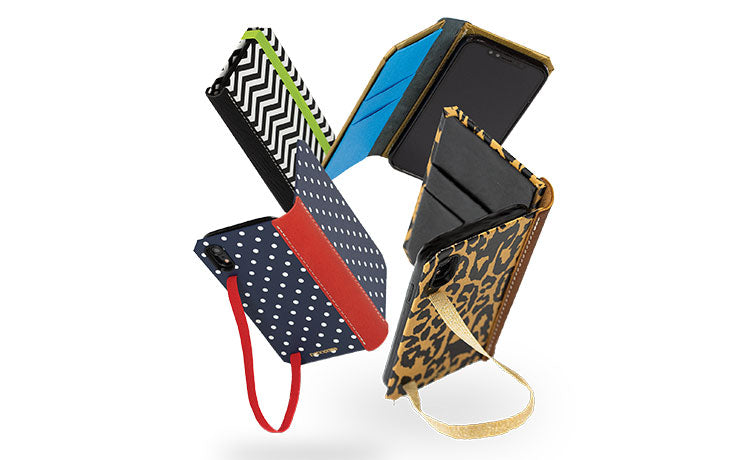
If you are building out a MagSafe setup, start with the case: our handcrafted iPhone cases include MagSafe-compatible styles, made with the same leathercraft techniques we have used since 2010.
Frequently Asked Questions
Does MagSafe work with any phone case?
It depends on the specific case you buy. Standard silicone or plastic cases are often too thick and will weaken the magnetic connection significantly. You need to purchase a specific "MagSafe Compatible" case that has its own integrated ring of magnets to bridge the connection between the charger and your phone.
Is MagSafe faster than wired charging?
No, a physical cable is still the fastest way to charge your iPhone. While MagSafe offers speeds up to 15W or 25W, which is faster than standard wireless charging, a USB-C cable can deliver significantly higher wattage. For a quick emergency top-up, plugging in directly is always the superior choice.
Can I use MagSafe on an older iPhone?
Older models like the iPhone 11 or X support wireless charging but lack the internal magnets for alignment. You can use a MagSafe charger as a standard wireless pad, but it will not snap into place or charge at full speed. You can add a magnetic sticker adapter to mimic the attachment.
Will the magnets damage my credit cards?
The magnets in the phone itself are generally safe for modern credit cards, but constant direct exposure creates a risk. However, official MagSafe wallets are shielded to protect the magnetic strips on your cards. If you carry loose cards in a pocket directly against the phone magnets, it is safer to keep them separate.
Does MagSafe cause the iPhone to overheat?
Wireless charging naturally generates more heat than wired charging due to energy loss during transmission. While the magnets align the coils to improve efficiency, the phone may still get warm during a fast charge. The iPhone has built-in software that will temporarily limit charging speed if the battery temperature gets too high.